Table of contents
Open Table of contents
Overview
In my home lab, I maintain a legacy server that is effectively a “frozen” environment. The specialized software it supports is sensitive for modern OS upgrades or kernel changes, making it a permanent fixture that I cannot touch. This creates a persistent observability gap. My modern telemetry stack is entirely incompatible with this server’s aging architecture. To make matters worse, the official collectors for this legacy stack reached end-of-life years ago and can’t communicate with my modern pipeline.
To bridge this gap, I decided to build a custom Python-based collector designed to scrape metrics directly from the server and ship them into my modern observability stack. But as soon as I executed my first script, but the results were immediate and frustrating. The server wouldn’t talk. There were no error messages, no handshake failures, and no protocol violations returned. Just a silent, immediate connection reset.
# My initial attempt
import socket

payload = b'{"command": "status", "id": 123}'
s = socket.socket(socket.AF_INET, socket.SOCK_STREAM)
s.connect(("127.0.0.1", 9999))
s.sendall(payload)
data = s.recv(1024)

# [*] Attempting connection to 127.0.0.1:9999
# [!] Connection failed: [Errno 104] Connection reset by peerclient.py
In high-scale environments, “silent” is the most expensive failure mode. I realized that to achieve observability, I first had to perform a reconstruction of the protocol itself.
Phase 1: The Network Layer
My first instinct was to see what was actually crossing the wire. If the server was sending an error, tcpdump would show it. I started a capture on the loopback interface, filtering for the target port.
sudo tcpdump -i lo -X port 9999The capture confirmed my suspicion. The TCP handshake (SYN, SYN-ACK, ACK) completed perfectly. Then, my client pushed its JSON payload:
0x0030:  7b 22 63 6f 6d 6d 61 6e 64 22 3a 20  ...{"command":.
0x0040:  22 73 74 61 74 75 73 22 2c 20 22 69  "status",."id":.
0x0050:  31 32 33 7d                          123}
But immediately after those 32 bytes, the server responded with a RST (Reset) flag. The server wasn’t just ignoring the data; it was actively slamming the door shut.
Phase 2: The System Call Layer
Knowing what was sent wasn’t enough. I needed to know when the server made its decision. I attached strace to the running server process to observe the conversation between the application and the Linux kernel.
sudo strace -p <PID> -e trace=network,read,write,closeThe output was the “smoking gun”:
accept(3, {sa_family=AF_INET, ...}, [16]) = 4
read(4, "{\"command", 9)                  = 9
close(4)                                  = 0
This was the first major break in my analysis. My client had sent 32 bytes, but the server had only requested 9 bytes via the read syscall. The moment those 9 bytes were returned, the server immediately executed close(4).
This moved my hypothesis from “the server is broken” to “the server is performing a validation check on a fixed-length header.” If those 9 bytes didn’t satisfy a specific requirement, the connection was dead.
Phase 3: The Instruction Layer
Now I had to move from the kernel to the CPU. I was looking for the exact assembly instruction where the server compares those 9 bytes and decides to kill the connection.
Because the binary was stripped of debug symbols, I couldn’t step through C code. I was looking at an opaque wall of assembly. I had to scan the main function to find where the read call was actually being triggered.
(gdb) disassemble main
...
0x0000555555555432 <+325>:   mov    -0x444(%rbp),%eax
0x0000555555555438 <+331>:   mov    $0x9,%edx
0x0000555555555440 <+339>:   mov    %eax,%edi
0x0000555555555442 <+341>:   call   0x555555555150 <read@plt>
There it was. I set a breakpoint on that read@plt call and used finish to jump to the instruction immediately following the return.
(gdb) break *0x0000555555555442
(gdb) run
...
Breakpoint 1, 0x0000555555555447 in main ()
Value returned is $1 = 9
I then examined the disassembly at the return point. The logic was laid bare:
0x00005555555554a7 <+442>:   cmpl   $0x50524f54,-0x440(%rbp)
0x00005555555554b1 <+452>:   jne    0x5555555554bc <main+463>
0x00005555555554b3 <+454>:   cmpb   $0x1,-0x455(%rbp)
0x00005555555554ba <+461>:   je     0x5555555554ce <main+481>
The cmpl instruction was comparing a value at a stack offset against the hex constant $0x50524f54. I performed a manual hex-to-ASCII conversion to verify:
50 52 4f 54 → PROT.
The server was expecting a “Magic Number” of PROT. If it didn’t match, the jne instruction would send the execution flow straight to the close() call. I continued this process, tracing the successful branch to find the version check (0x01) and the logic for the payload length and the checksum.
The Protocol Reconstruction
By combining the network traces, the syscall patterns, and the assembly analysis, I reconstructed the protocol’s state machine.
Protocol Specification
| Field | Size | Type | Value / Constraint |
|---|---|---|---|
| Magic | 4B | uint32_t (BE) | 0x50 52 4F 54 (PROT) |
| Version | 1B | uint8_t | 0x01 |
| Length | 4B | uint32_t (BE) | N ≤ 512 |
| Payload | NB | char[] | The actual data |
| Checksum | 2B | uint16_t (LE) | XOR sum of payload bytes |
Handshake Logic
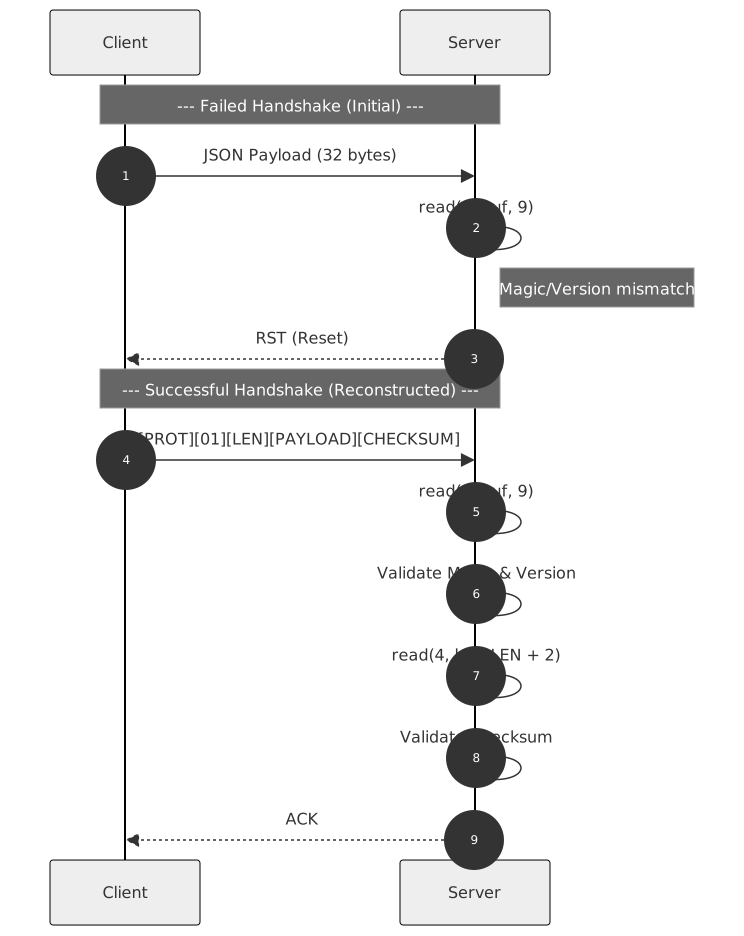
The Payoff
With the specification in hand, I rewrote the Python client to adhere to the discovered state machine.
import socket
import struct

def client():
    target_ip = "127.0.0.1"
    target_port = 9999

    # Protocol Constants
    MAGIC = 0x50524F54
    VERSION = 0x01
    payload = b"RECONSTRUCTED_PAYLOAD"

    # Calculate XOR Checksum
    checksum = 0
    for byte in payload:
        checksum ^= byte

    # Build the packet
    # >I: Big-endian uint32 (Magic)
    # B:  uint8 (Version)
    # >I: Big-endian uint32 (Length)
    header = struct.pack(">I B I", MAGIC, VERSION, len(payload))

    # <H: Little-endian uint16 (Checksum)
    footer = struct.pack("<H", checksum)

    packet = header + payload + footer

    print(f"[*] Sending reconstructed packet ({len(packet)} bytes)")

    try:
        s = socket.socket(socket.AF_INET, socket.SOCK_STREAM)
        s.connect((target_ip, target_port))
        s.sendall(packet)

        data = s.recv(1024)
        print(f"[+] Success! Server responded: {data.decode()}")
        s.close()
    except Exception as e:
        print(f"[!] Failed: {e}")

if __name__ == "__main__":
    client()client.py
Result:
[*] Sending reconstructed packet (28 bytes)
[+] Success! Server responded: ACK
When dealing with proprietary or legacy systems, documentation is often non-existent. If a system fails silently, you cannot debug at the application level. You must descend into the observability stack moving from the wire (tcpdump), through the syscalls (strace), and finally into the instruction stream (gdb).