Table of contents
Open Table of contents
Overview
As we know, all the compiled java classes runs inside the JVM. The default class loader from Sun loads the classes into JVM and executes it. This class loader is a part of JVM which loads the compiled byte code to memory. In this article, I will show how to convert a compiled java class to a array of bytes and then load these array of bytes into another class (which can be over the network) and execute the array of bytes.
So the question arises, why should we write a custom class loader ? There are some distinct advantages. Some of them below
- We can load a class over any network protocol. Since the java class can be converted to a series of numbers (array of bytes), we can use most of the protocols.
- Load Dynamic classes based on the type of user, especially useful when you want to validate the license of your software over the web and if you are paranoid about the security.
- More flexible and secure, you can encrypt the byte stream (asymmetric or symmetric) ensuring safer delivery.
For this article we will be creating three classes
- JavaClassLoader – The custom class loader which will load the array of bytes and execute. In other words, the client program.
- Class2Byte – The Java class which converts any compiled class / object to a array of bytes
- ClassLoaderInput – The class which will be converted to array of bytes and transferred
Let’s divide this article into two sections, in the fist section we will convert the java class to array of bytes and in the second section, we will load that array.
Create & Convert the Java class to array of bytes
Let’s write a simple class (ClassLoaderInput) which just prints a line. This is the class which will be converted to a byte array.
public class ClassLoaderInput {
    public void printString() {
        System.out.println("Hello World!");
    }
}ClassLoaderInput.java
Now, let’s write another class (Class2Byte) which will convert the ClassLoaderInput to a byte of array. The concept to convert the file is simple, compile the above file and load the class file through input stream and with an offset read and convert the class to bytes and write the output in to another out stream. We need these bytes as a comma separated value, so we will use StringBuffer to add comma between the bytes.
int _offset=0;
int _read=0;

File fileName = new File(args [0]);
InputStream fileInputStream = new FileInputStream(fileName);
FileOutputStream fileOutputStream = new FileOutputStream(args[1]);
PrintStream printStream = new PrintStream(fileOutputStream);
StringBuffer bytesStringBuffer = new StringBuffer();

byte[] byteArray = new byte[(int)fileName.length()];
while (_offset < byteArray.length &&
    (_read=fileInputStream.read(byteArray, _offset,
    byteArray.length-_offset)) >= 0)
        _offset += _read;

fileInputStream.close();
for (int index = 0; index < byteArray.length; index++)
    bytesStringBuffer.append(byteArray[index]+",");

printStream.print(bytesStringBuffer.length()==0 ? "" :
    bytesStringBuffer.substring(0, bytesStringBuffer.length()-1));Class2Byte.java
Now let’s run this file and generate the output. A sample output from my machine is below.
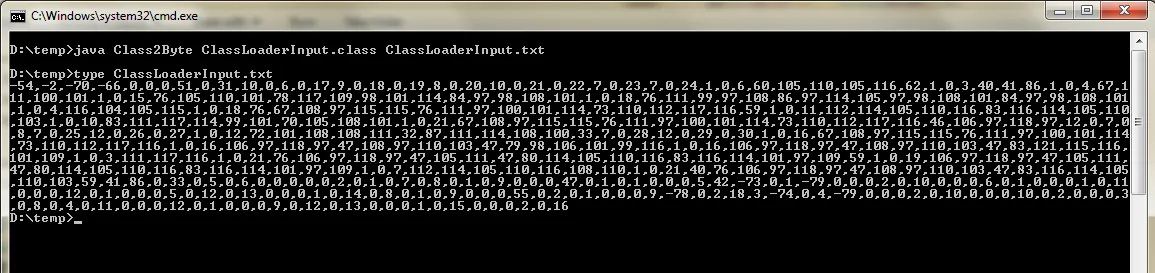
Now,we have the sample class (ClassLoaderInput) file as a bunch of numbers. Now this bunch of numbers can be transferred over any protocol to our custom class loader which will “reconstruct” the class from these bytes and run it, without any physical trace in the client machine (the array of bytes will be on memory).
Load the array of bytes and execute
Now, to the important part of this article, we are going to write a custom class loader which will load those bunch of numbers (array) and execute them. The array of bytes can be transferred over the network but in this example, we will define it as a string in the class loader for demonstration purpose.
Let’s start by defining the array of bytes.
private int[] data = {-54,-2,-70,-66,0,0,0,51,0,31,10,0,6,0,17,9,0,18,0,19,8,
    0,20,10,0,21,0,22,7,0,23,7,0,24,1,0,6,60,105,110,105,116,62,1,0,3,40,41,86,1,
    0,4,67,111,100,101,1,0,15,76,105,110,101,78,117,109,98,101,114,84,97,98,108,
    101,1,0,18,76,111,99,97,108,86,97,114,105,97,98,108,101,84,97,98,108,101,1,0,
    4,116,104,105,115,1,0,18,76,67,108,97,115,115,76,111,97,100,101,114,73,110,
    112,117,116,59,1,0,11,112,114,105,110,116,83,116,114,105,110,103,1,0,10,83,
    111,117,114,99,101,70,105,108,101,1,0,21,67,108,97,115,115,76,111,97,100,101,
    114,73,110,112,117,116,46,106,97,118,97,12,0,7,0,8,7,0,25,12,0,26,0,27,1,0,
    12,72,101,108,108,111,32,87,111,114,108,100,33,7,0,28,12,0,29,0,30,1,0,16,67,
    108,97,115,115,76,111,97,100,101,114,73,110,112,117,116,1,0,16,106,97,118,97,
    47,108,97,110,103,47,79,98,106,101,99,116,1,0,16,106,97,118,97,47,108,97,110,
    103,47,83,121,115,116,101,109,1,0,3,111,117,116,1,0,21,76,106,97,118,97,47,105,
    111,47,80,114,105,110,116,83,116,114,101,97,109,59,1,0,19,106,97,118,97,47,105,
    111,47,80,114,105,110,116,83,116,114,101,97,109,1,0,7,112,114,105,110,116,108,
    110,1,0,21,40,76,106,97,118,97,47,108,97,110,103,47,83,116,114,105,110,103,59,
    41,86,0,33,0,5,0,6,0,0,0,0,0,2,0,1,0,7,0,8,0,1,0,9,0,0,0,47,0,1,0,1,0,0,0,5,42,
    -73,0,1,-79,0,0,0,2,0,10,0,0,0,6,0,1,0,0,0,1,0,11,0,0,0,12,0,1,0,0,0,5,0,12,0,
    13,0,0,0,1,0,14,0,8,0,1,0,9,0,0,0,55,0,2,0,1,0,0,0,9,-78,0,2,18,3,-74,0,4,-79,
    0,0,0,2,0,10,0,0,0,10,0,2,0,0,0,3,0,8,0,4,0,11,0,0,0,12,0,1,0,0,0,9,0,12,0,13,
    0,0,0,1,0,15,0,0,0,2,0,16};JavaClassLoader.java
The conversion of these bytes to class is done by the ClassLoader.defineClass() method We should supply the stream of bytes that make up the class data. The bytes in positions off through off+len-1 should have the format of a valid class file as defined by the Java Virtual Machine Specification. The offset and length will be the additional parameters. Once the defineClass converts the array to class, then we can use reflection to execute the methods in the class.
JavaClassLoader _classLoader = new JavaClassLoader();
byte[] rawBytes = new byte[_classLoader.data.length];
for (int index = 0; index < rawBytes.length; index++)
    rawBytes[index] = (byte) _classLoader.data[index];
Class regeneratedClass = _classLoader.defineClass(args[0],
    rawBytes, 0, rawBytes.length);
regeneratedClass.getMethod(args[1], null).invoke(null, new Object[] { args });JavaClassLoader.java
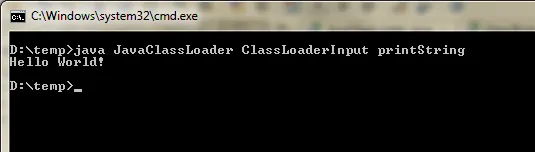
Now, let’s compile the class loader and run. The the class file name & method name should be passed as a run time argument. If you have done everything right, you should see the output from the input class which we created (ClassLoaderInput) initially. Sample output from my machine below.
Full source of this application is available in runtime-reflections repository.